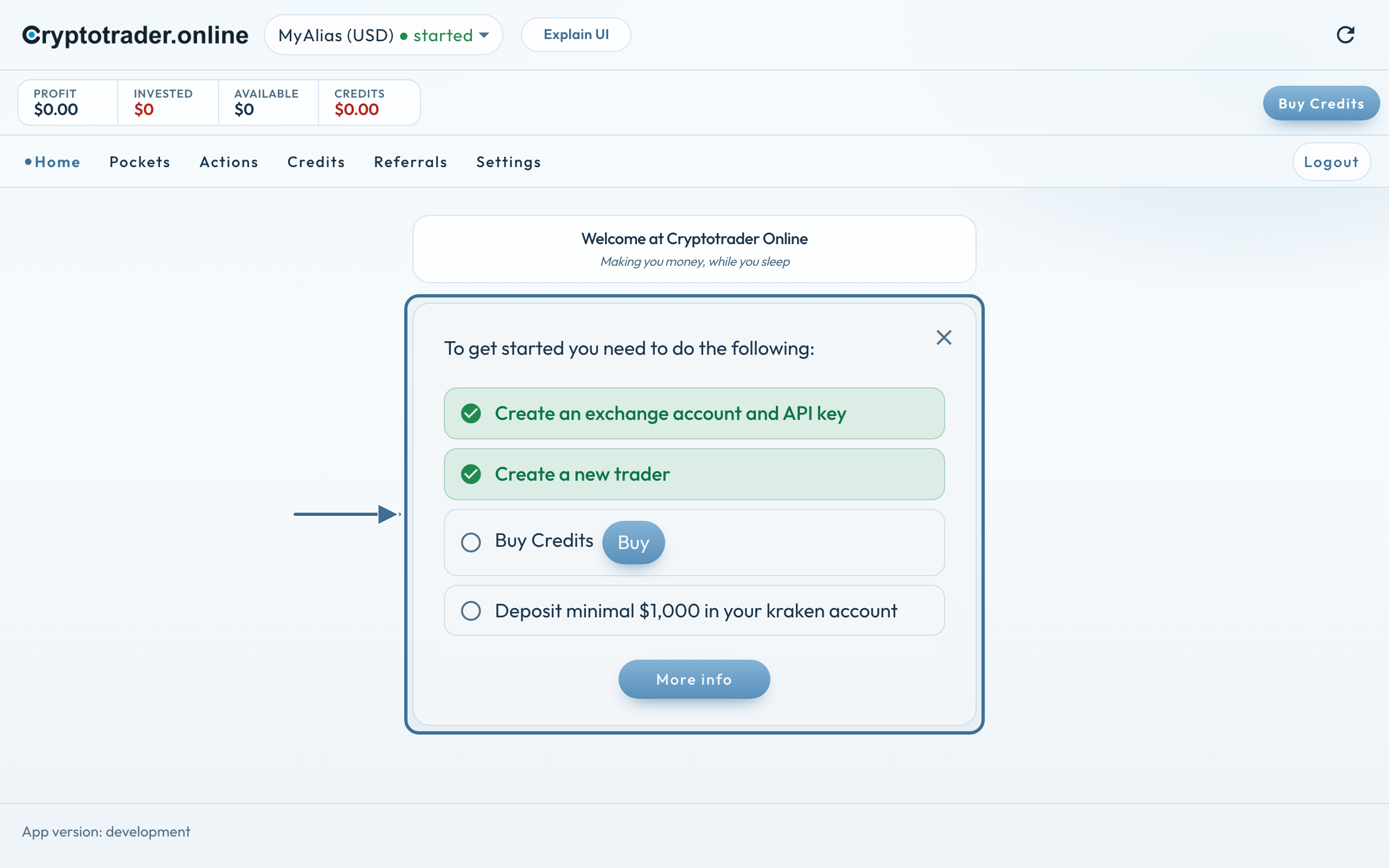
The setup guide is only for new users who just registered. Without a trader, Home shows a short list: what you still need to do to get started. Unfinished steps stay on screen — an empty check until it is done, then green.
After registration you log in. Home then shows the setup guide. Existing users who already have a trader do not see it. Pockets and Actions are not in the menu yet: they appear once you have a trader.
The steps
Create an exchange account and API key — button to Getting started.
Create a new trader — button to create a trader.
Buy credits — so the trader can run.
Deposit at least $1,000 on your exchange — that step is in the list from the first screen, not only later.
A finished step does not disappear. The check turns green. You see what is already done and what is still open. Creating a trader ticks off the first two steps.
First two steps green. Credits and deposit are still open.
We use cookies for the website (essential, including coupon/affiliate) and, only with your consent, for statistics via Google Tag Manager. Reject does not load tracking.